Meesho Profit & Loss Tracking: How to Calculate Your Real Margins in 2026
By Divyanshu Jain · 4 March 2026
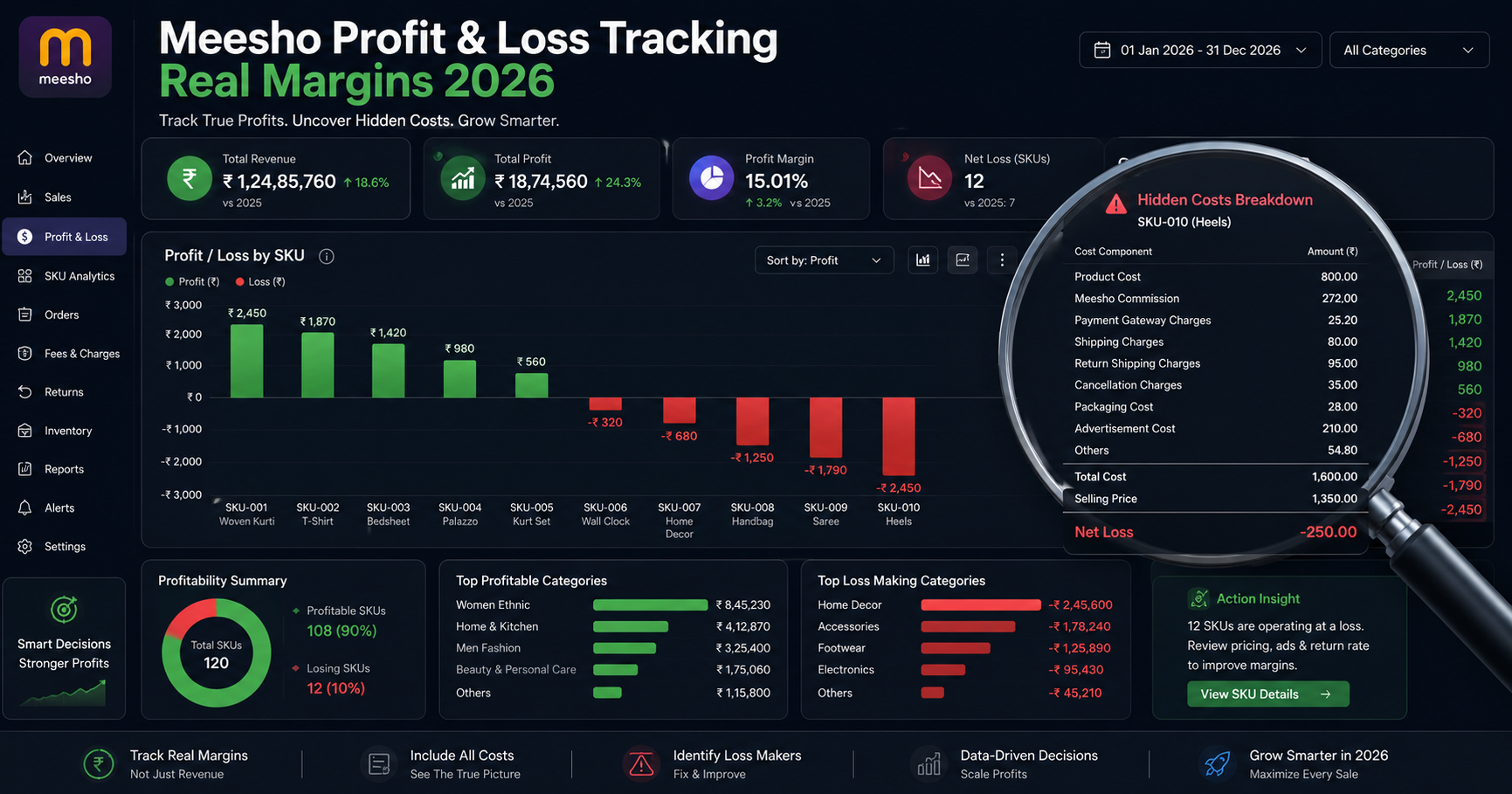
Key Takeaways
- Meesho's seller panel shows revenue — not profit. You need external tracking to know real margins.
- True P&L requires tracking 7 cost components: product cost, commission, shipping, GST, packaging, RTO, and returns
- Most sellers discover 20–40% of their SKUs are unprofitable when they first do proper P&L analysis
- Monthly P&L review is the single highest-ROI activity for scaling sellers
- Automate tracking with the VariantStudio P&L Dashboard — upload reports, see real margins instantly
The Problem: Meesho Doesn't Show You Profit
Open your Meesho Supplier Panel right now. You'll see: total orders, total revenue, pending payments, and settlement amounts. What you won't see: your actual profit.
Meesho shows you the money flowing through the system — not what stays in your pocket. The difference between revenue and profit on Meesho can be 40–70%, meaning for every ₹1,000 in sales, only ₹300–600 is actual profit.
Without proper P&L tracking, sellers make dangerous decisions:
- Scaling products that are actually losing money per order
- Running promotions that push margins below zero
- Ignoring RTO costs that silently eat 10–15% of revenue
- Buying more inventory of unprofitable SKUs
- Thinking they're growing when they're actually bleeding cash
What a Complete Meesho P&L Looks Like
Here's the full profit waterfall for a typical Meesho order:
| Line Item | Example (₹500 product) | % of Revenue |
|---|---|---|
| Gross Revenue (Selling Price) | ₹500 | 100% |
| − Product Cost (COGS) | −₹180 | 36% |
| = Gross Margin | ₹320 | 64% |
| − Meesho Commission | −₹50 | 10% |
| − Shipping Charges | −₹65 | 13% |
| − GST on Commission | −₹9 | 1.8% |
| − Packaging Cost | −₹15 | 3% |
| − RTO Loss (amortized) | −₹26 | 5.2% |
| − Returns/Damage Loss | −₹10 | 2% |
| = Net Profit | ₹145 | 29% |
That "64% gross margin" product actually yields 29% net. And this is a good scenario — heavy products or high-RTO categories can drop to 10–15% net.
The 7 Cost Components You Must Track
1. Product Cost (COGS)
Your purchase price including GST paid to supplier. If you buy at ₹170 + 5% GST = ₹178.50 actual cost. Many sellers forget to include the GST they paid, understating costs by 5–18%.
How to track: Maintain a simple spreadsheet with SKU → purchase price (inclusive of GST). Update whenever you reorder at different rates.
2. Meesho Commission
Ranges from 5% to 25% depending on category. This is clearly shown in your Meesho settlement report.
How to track: Download the Payment Report from Meesho — commission is a separate column. For category-wise rates, see our commission rates guide.
3. Shipping Charges
Deducted per order based on weight slab and delivery zone. The single largest variable cost for most sellers.
How to track: Shipping charge appears in the Order Report and Payment Report. For optimization, use our shipping calculator. Full rate breakdown in our shipping charges guide.
4. GST on Commission
18% GST charged on Meesho's commission amount. Small per order but adds up — on ₹50,000/month commission, that's ₹9,000 in GST.
How to track: Shown in the Tax Detail Report. Can be claimed as ITC in your GSTR-3B filing.
5. Packaging Costs
₹10–30 per order depending on product type and packaging quality. Often ignored because it's paid separately (not deducted by Meesho).
How to track: Calculate average packaging cost per order type. Poly bag orders: ₹5–8. Box orders: ₹15–25. Fragile items: ₹20–35.
6. RTO Losses
When orders are returned undelivered, you lose forward + return shipping plus packaging. This doesn't appear as a Meesho deduction — it's an invisible cost.
How to track: (Monthly RTO orders × average double-shipping cost) ÷ delivered orders = RTO cost per successful delivery. Reduce this with strategies from our RTO reduction guide.
7. Customer Returns & Damage
Products returned within 7 days (customer-initiated) may come back damaged or unsellable. Budget 1–3% of revenue for this.
How to track: Count returned items that can't be resold at full price. The loss = original cost + shipping paid − salvage value.
How to Set Up P&L Tracking (3 Methods)
Method 1: Manual Spreadsheet (Free, Time-Consuming)
Create a Google Sheet with these columns:
- Order ID | SKU | Selling Price | Product Cost | Commission | Shipping | Packaging | Status (Delivered/RTO/Returned)
Download Meesho's Order Report monthly and fill in product costs manually. Calculate profit per row.
Pros: Free, full control
Cons: Takes 2–4 hours/month for 200+ orders, error-prone, no real-time visibility
Method 2: VariantStudio P&L Dashboard (Recommended)
The VariantStudio Profit & Loss tool automates the entire process:
- Upload your Meesho Order Report and Payment Report (Excel files)
- Enter product costs per SKU (one-time setup, saved for future months)
- Instantly see: profit per order, profit per SKU, monthly totals, RTO impact
What you get:
- Per-order profit breakdown (all 7 cost components)
- Per-SKU margin ranking (find your winners and losers)
- Monthly/quarterly/yearly trend views
- RTO cost as a separate visible line item
- Reconciliation against Meesho payment settlements
- Export to Excel for your CA
Pros: 5-minute setup, accurate, visual, tracks trends
Cons: Requires VariantStudio subscription (₹249/month for all tools)
Method 3: Tally Integration (For CA-Managed Accounts)
If your CA manages books in Tally, use the Tally XML Converter to import all Meesho transactions. Then run P&L reports directly in Tally with proper accounting treatment.
Pros: Integrated with your formal books, CA-friendly
Cons: Requires Tally software, less real-time than dashboard approach
Reading Your P&L: What to Look For
Red Flags (Act Immediately)
- Any SKU with negative margin: Delist or reprice immediately
- RTO cost exceeding 8% of revenue: Implement RTO reduction strategies
- Shipping exceeding 20% of revenue: Products are too heavy for their price point
- Month-over-month margin decline: Investigate — rising costs? More RTO? Category commission increase?
Green Signals (Scale These)
- SKUs with 35%+ net margin: Increase inventory, run ads if available
- Products with <5% RTO: Your listing quality is excellent for these
- Improving margins month-over-month: Your optimizations are working
Worked Example: Monthly P&L Analysis
Seller profile: 300 orders/month, 45 SKUs, average selling price ₹450
| Metric | Amount | % of Revenue |
|---|---|---|
| Gross Revenue | ₹1,35,000 | 100% |
| Product Costs | −₹47,250 | 35% |
| Meesho Commission | −₹13,500 | 10% |
| Shipping | −₹18,000 | 13.3% |
| GST on Commission | −₹2,430 | 1.8% |
| Packaging | −₹4,500 | 3.3% |
| RTO Losses (18% rate) | −₹8,424 | 6.2% |
| Returns/Damage | −₹2,700 | 2% |
| Net Profit | ₹38,196 | 28.3% |
Key insight: This seller thinks they're making ₹87,750 (revenue minus product cost = 65% margin). Reality: ₹38,196 (28.3% margin). The gap is ₹49,554/month in costs they weren't tracking.
After P&L analysis, this seller discovered:
- 8 SKUs (out of 45) were unprofitable — delisted, saving ₹4,200/month in losses
- Switching to poly bags for 60% of orders saved ₹1,800/month in packaging
- Reducing RTO from 18% to 12% (better descriptions) saved ₹3,400/month
- Total improvement: ₹9,400/month (+25% profit increase)
Monthly P&L Review Checklist
Do this on the 1st of every month for the previous month:
- ☐ Download Order Report and Payment Report from Meesho
- ☐ Upload to P&L Dashboard (or update spreadsheet)
- ☐ Check overall net margin — is it above 25%?
- ☐ Identify bottom 5 SKUs by margin — delist or reprice?
- ☐ Check RTO rate — above 15%? Review listings for those products
- ☐ Compare with previous month — improving or declining?
- ☐ Update product costs if you reordered at different rates
- ☐ Export summary for your CA/tax filing
This 30-minute monthly review is the highest-ROI activity for any Meesho seller. It directly tells you what to sell more of, what to stop selling, and where you're leaking money.
Frequently Asked Questions
Q: Can I track profit in real-time or only monthly?
Meesho releases settlement data with a 7–15 day delay, so true real-time isn't possible. However, you can estimate daily profit by applying your known cost structure to daily order counts. The P&L Dashboard updates whenever you upload new reports.
Q: How do I handle products with variable costs (seasonal pricing)?
Use the most recent purchase price for current inventory. When you reorder at a different rate, update the cost in your tracking system. For mixed inventory (old stock at ₹150, new stock at ₹170), use weighted average: (qty1 × price1 + qty2 × price2) ÷ total qty.
Q: Should I include my salary/time as a cost?
For business decision-making (which products to sell), exclude personal salary — it's a fixed cost regardless of product mix. For evaluating "is Meesho worth my time vs a job," include your hourly opportunity cost. Both views are valid for different decisions.
Q: What's a healthy profit margin for a new Meesho seller?
New sellers (first 3 months): 15–20% net is acceptable while learning. Established sellers (6+ months): target 25–35% net. Below 15% net is unsustainable unless you're doing very high volume (1,000+ orders/month) where absolute profit compensates.
Q: How do I account for unsold inventory in P&L?
Unsold inventory is a balance sheet item, not a P&L expense — until you write it off. If you have dead stock that won't sell, write off the cost in the month you decide to liquidate or discard it. Don't let dead inventory hide in your "assets" forever.
Conclusion
Profit tracking isn't optional — it's the difference between a growing business and one that's slowly bleeding money without knowing it. Every successful Meesho seller we've worked with (1,000+ sellers on VariantStudio) has one thing in common: they know their numbers.
Start today:
- Download last month's reports from Meesho
- Upload to the VariantStudio P&L Dashboard
- Find your unprofitable SKUs and fix or delist them
- Repeat monthly — watch your margins improve
The sellers who track profit grow. The ones who don't eventually quit wondering "where did all the money go?"
Last updated: May 2026. Cost structures verified against current Meesho seller panel data and payment reports.