Meesho Product Photography Tips: Take Better Photos That Sell More
By Divyanshu Jain · 8 March 2026
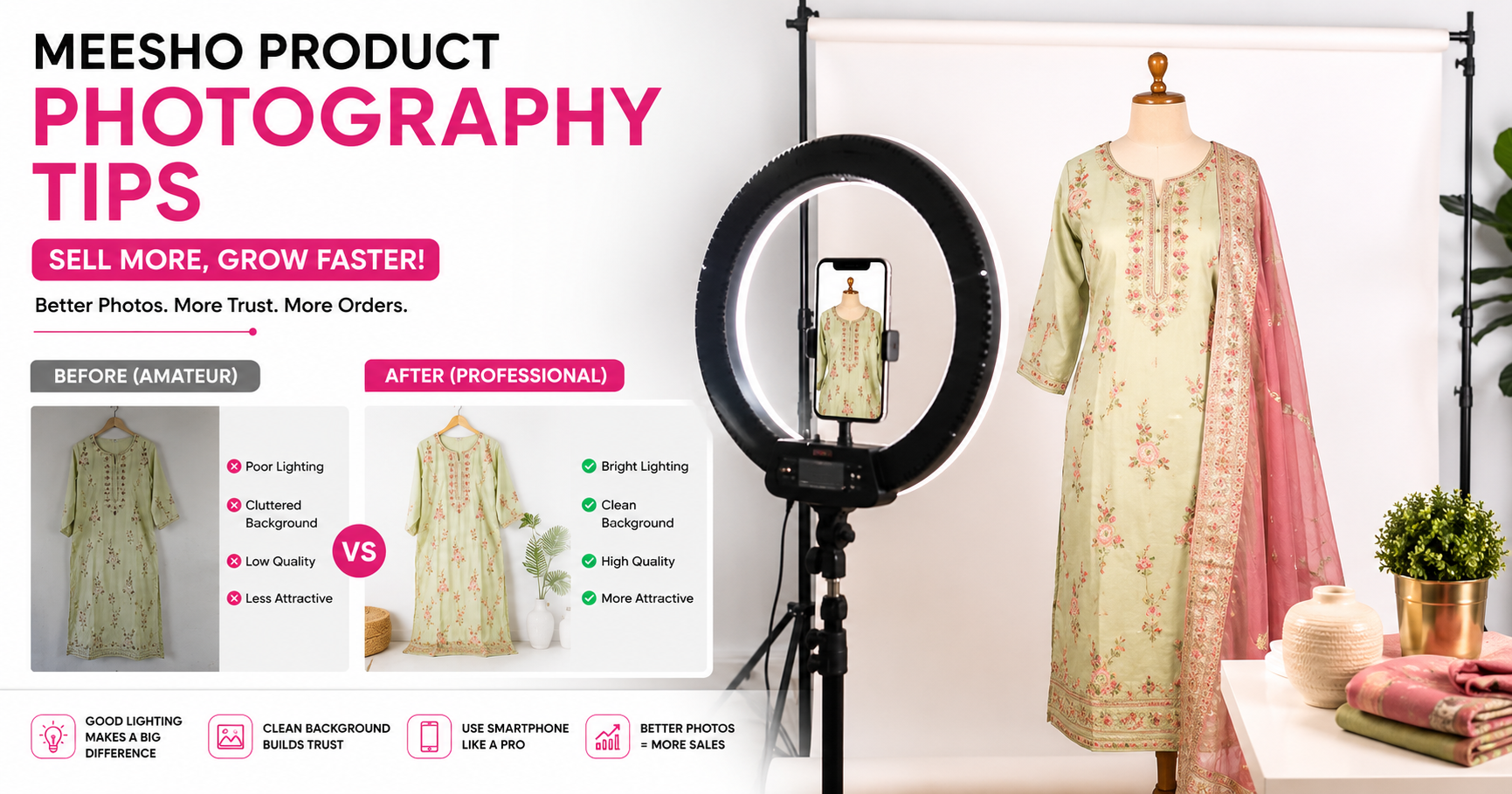
Key Takeaways
- Meesho product images are the #1 factor in click-through rate — better photos = more orders, period
- You don't need expensive equipment: a smartphone + ₹500 setup produces professional results
- White/light background, natural lighting, and multiple angles are non-negotiable
- Meesho requires minimum 3 images; top sellers use 5–7 with lifestyle + detail shots
- AI-generated SEO titles from product images boost search visibility — use the AI Listing tool
Why Product Photos Make or Break Your Meesho Sales
On Meesho, buyers can't touch, feel, or try your product. Your photos are the entire shopping experience. Data from top Meesho sellers shows:
- Listings with 5+ images get 3.2× more clicks than those with 3 images
- Products with lifestyle photos (worn/in-use) have 40% lower RTO — buyers know what to expect
- Clear detail shots reduce "not as described" returns by 25–30%
Yet most sellers upload blurry phone photos with cluttered backgrounds, losing sales to competitors with identical products but better images.
The Minimum Setup You Need (Under ₹500)
| Item | Cost | Purpose |
|---|---|---|
| White chart paper (5 sheets) | ₹50 | Clean background |
| Cardboard box (as stand) | ₹0 (reuse) | Prop support |
| Clip-on phone lens (optional) | ₹200 | Better close-ups |
| Transparent tape + pins | ₹30 | Secure backdrop |
| White LED bulb (if no window) | ₹150 | Consistent lighting |
| Total | ₹430 |
Your smartphone camera (2020 or newer) is more than sufficient. No DSLR needed.
Lighting: The Single Most Important Factor
Natural Light (Best, Free)
Shoot near a large window between 10 AM – 2 PM. Place the product facing the window with white chart paper as backdrop. The light should be diffused (not direct harsh sunlight).
Setup:
- Window on one side (main light source)
- White chart paper on the opposite side (reflects light, reduces shadows)
- Product in between, slightly angled toward the window
Artificial Light (Consistent, Rainy Days)
Two white LED bulbs (6500K daylight color) positioned at 45° angles to the product. Avoid yellow/warm bulbs — they make colors look inaccurate, leading to returns.
Common Lighting Mistakes
- Overhead room light only: Creates harsh shadows underneath — unusable
- Flash: Washes out colors and creates glare — never use phone flash
- Mixed lighting: Window + tube light creates color cast — use one source only
- Evening/night shooting: Artificial light changes fabric colors — shoot in daylight
The 7 Shots Every Meesho Listing Needs
1. Hero Shot (Main Image)
Full product on white background, centered, filling 80% of the frame. This is what appears in search results — it must be clean, bright, and immediately recognizable.
Tips: Shoot slightly from above (15° angle). Iron/steam the product first. Remove all tags and stickers.
2. Lifestyle Shot (In Use)
Product being worn or used in context. For clothing: on a person or mannequin. For home items: in a room setting. This helps buyers visualize ownership.
Tips: Keep the background simple (plain wall, minimal furniture). Focus should be on the product, not the model or setting.
3. Back View
Shows the complete product from behind. Essential for clothing (back design, closure type), bags (back pocket), and electronics (ports, labels).
4. Close-Up Detail
Fabric texture, stitching quality, print detail, or material finish. This builds trust — it says "we have nothing to hide about quality."
5. Size Reference
Product next to a common object (hand, ruler, coin) or with measurements overlaid. Reduces "too small/too big" returns significantly.
6. Color Accuracy Shot
If the product comes in multiple colors, show the actual color in natural light. Include a white reference (paper edge) so buyers can judge color accuracy on their screen.
7. Packaging/What's Included
Show everything the buyer receives — product + accessories + packaging. Sets correct expectations and reduces "incomplete order" complaints.
Phone Camera Settings for Best Results
| Setting | Recommended | Why |
|---|---|---|
| Resolution | Highest available | Meesho compresses images; start with max quality |
| HDR | ON | Balances highlights and shadows |
| Flash | OFF (always) | Creates unnatural lighting |
| Grid lines | ON | Helps center the product |
| Aspect ratio | 1:1 (square) | Matches Meesho's display format |
| Focus | Tap on product | Ensures product is sharp, background slightly soft |
| Zoom | Never use digital zoom | Reduces quality — move closer instead |
Background Options by Category
Fashion & Clothing
- Flat lay: Product laid flat on white surface, shot from directly above
- Hanger shot: On a wooden/velvet hanger against white wall
- Mannequin: Best for showing fit and drape (₹800–1,500 for a half-body mannequin)
- Model: Highest conversion but most expensive — use for hero products only
Home & Kitchen
- White background: For the main image (Meesho prefers this)
- In-context: On a table, shelf, or kitchen counter for lifestyle shots
- Scale reference: Next to common items (mug, plate) to show size
Electronics & Accessories
- White/grey gradient: Professional look for tech products
- 45° angle: Shows depth and build quality
- Ports/buttons close-up: Essential for buyer confidence
Post-Processing: Quick Edits That Make a Difference
Use free apps (Snapseed, Lightroom Mobile) for these 3 edits only:
- Brightness +10–20%: Makes the image pop in Meesho's feed
- White balance correction: Ensure whites look white, not yellow or blue
- Crop to square: Center the product with equal margins on all sides
Don't over-edit: Heavy filters, saturation boost, or color manipulation leads to "color different from photo" returns. The goal is accurate representation with good lighting, not Instagram aesthetics.
From Photos to Optimized Listings: The AI Advantage
Great photos do double duty — they attract buyers AND can generate optimized listing content. The VariantStudio AI Listing tool analyzes your product images and generates:
- SEO-optimized titles with relevant keywords
- Detailed product descriptions highlighting visible features
- Accurate attribute suggestions (color, pattern, material) from image analysis
- Category recommendations based on product type detection
Better input photos = better AI output = higher search visibility on Meesho.
Common Photography Mistakes That Kill Sales
Mistake 1: Cluttered Background
Bed sheets, messy rooms, or other products visible in frame. Buyers subconsciously associate clutter with low quality. Always use a clean, single-color background.
Mistake 2: Inconsistent Image Style
First image on white background, second on wood, third on fabric. This looks unprofessional. Maintain the same background and lighting across all images for one product.
Mistake 3: Watermarks or Text Overlays
Adding your brand name, price, or "COD Available" text on images. Meesho may reject these, and they look spammy. Let the product speak for itself.
Mistake 4: Wrong Aspect Ratio
Uploading landscape (16:9) images that get cropped awkwardly in Meesho's square display. Always shoot and crop to 1:1 square format.
Mistake 5: Only Showing the "Good Side"
Hiding defects or showing only the best angle leads to returns. Show the product honestly from all angles — buyers who know what they're getting don't return items.
Frequently Asked Questions
Q: What image size does Meesho require?
Minimum 450×450 pixels, recommended 1000×1000 or higher. Maximum file size is 5MB. Shoot at your phone's highest resolution and let Meesho handle compression.
Q: Can I use the same images for multiple color variants?
No — each color variant must have its own photos showing the actual color. Using the same image for "Blue" and "Navy" variants will confuse buyers and increase returns.
Q: Should I invest in a lightbox?
For small products (jewelry, accessories, electronics), a ₹1,000–2,000 lightbox is worth it — consistent lighting every time. For clothing, a lightbox is too small; use the window + white paper setup instead.
Q: How often should I update product photos?
Update when: (1) you get "not as described" returns, (2) your click-through rate drops below category average, (3) you restock with a slightly different batch, or (4) competitors have noticeably better images for similar products.
Conclusion
Professional-looking product photos don't require professional equipment — just good lighting, a clean background, and the right technique. Invest 30 minutes learning these basics and your Meesho listings will outperform 80% of competitors who still upload blurry, poorly-lit images.
Combine great photos with AI-powered listing optimization using VariantStudio's Listing Automation — your images become the foundation for SEO-optimized titles, descriptions, and attributes that rank higher in Meesho search.
Last updated: May 2026. Image requirements verified against current Meesho Supplier Panel upload specifications.